

Where can I find my page overview?
Page overview
When you click Pagina's, you see the overview below. It lists every page that has been created.
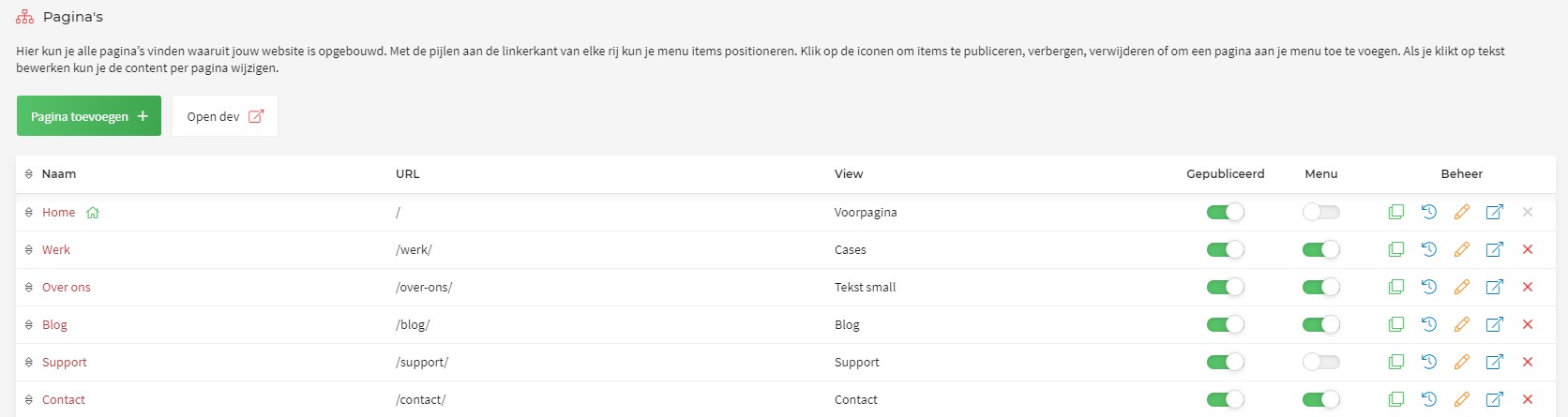
- To hide the page in the menu, untick the green dot under Menu; it then turns grey. Please note: the page can still be reached through its URL.
- If you do not want to show the page at all, switch off the green tick under Gepubliceerd. The page can then no longer be reached through the menu or through its URL.
- To edit a page that was created earlier, click the yellow pencil and make the changes you want.
- Clicking the red cross lets you delete a page.